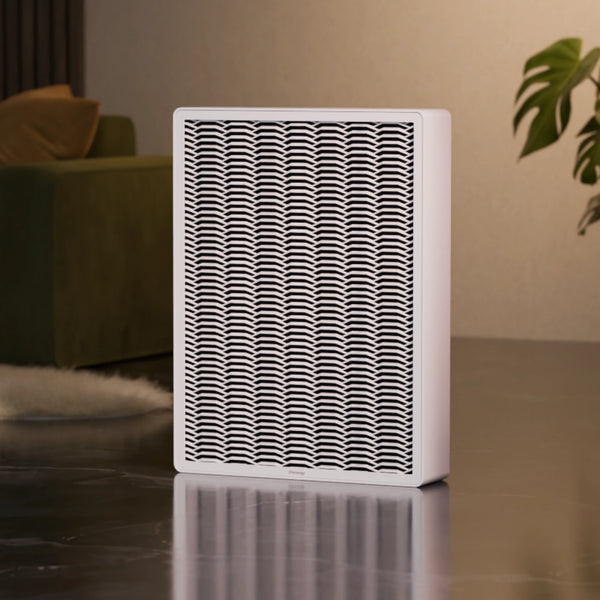
Ofen 2 Pro

New

€2.233,33

Price excl. VAT
Free shipping
Delivery: ...
Color
1,100 W
Power
Up to 55m²
Area heated
Up to 60 TH/s
Mining power
€ 808 per winter *
Bitcoin earnings
90 × 32 × 14 cm
Size
35 dB
Noise level
* Based on 4-year BTC average as of 01.2026
Free shipping Free shipping
Delivery:
30-day-return 30-day-return
10,000+ Satisfied customers 10,000+ Satisfied customers
Product information

The 21energy Ofen 2 Pro is perfect for you, if you want to heat your home and earn Bitcoin at the same time. Imagine having a heater that not only keeps your home warm, but also provides you with additional income. The Ofen 2 Pro offers a heat output of up to 1,100 watts and can heat rooms up to 55 m². It runs whisper-quiet — under 35 dB on the lowest setting, 40 dB on the medium setting and 45 dB on the highest setting.

Ofen 2 Pro

New
Ofen 2 black color variant with a white cat lying on top in a living room setting.
Bitcoin Heater Ofen 2 with text indicating it heats up rooms up to 55 m²
Bitcoin Heating device Ofen 2 black variant with text indicating electricity usage, heat output, and cashback system on a dark background.
Black color Ofen 2 on a wooden floor with 'Whisper-quiet' text indicating 35 dB.
Ofen 2 bitcoin heater with text 'Cozy warmth Especially for kids & pets' on a blurred background
Person holding a smartphone with app interface displaying smart schedules and automations for Ofen 2, with a blurred background.
Ofen 2 - White thermostat on a dark background with text 'Thermostat is included for maximum comfort'.
Ofen 2 with measurements on a beige background
Ofen 2 on a red background with 'Made in Austria' text
  • Ofen 2 black color variant with a white cat lying on top in a living room setting.
  • Bitcoin Heater Ofen 2 with text indicating it heats up rooms up to 55 m²
  • Bitcoin Heating device Ofen 2 black variant with text indicating electricity usage, heat output, and cashback system on a dark background.
  • Black color Ofen 2 on a wooden floor with 'Whisper-quiet' text indicating 35 dB.
  • Ofen 2 bitcoin heater with text 'Cozy warmth Especially for kids & pets' on a blurred background
  • Person holding a smartphone with app interface displaying smart schedules and automations for Ofen 2, with a blurred background.
  • Ofen 2 - White thermostat on a dark background with text 'Thermostat is included for maximum comfort'.
  • Ofen 2 with measurements on a beige background
  • Ofen 2 on a red background with 'Made in Austria' text
5 stars 1,000+ reviews
Trustpilot 4.8
Google 4.9
5 stars 1,000+ reviews
Trustpilot 4.8
Google 4.9
10,000+ happy customers in 40 countries worldwide
4.8 out of 5 star rating verified on Trustpilot
Fast shipping from Austria with no customs in EU
Fast & expert multilingual support

What customers say

10,000+ satisfied customers and trusted by thousands of homes across Europe.

In the box

Ofen 2 Pro

1.100 W

Thermostat

Connect via Bluetooth

Power cord

1 m

Manual

Quickstart guide
Calculate your earnings

Calculate your earnings

Electricity
&
Heat & Bitcoin
Earnings

You earn

€ 0,17 / kWh cashback
€ 808 / winter
How it's calculated = € 0,17 × 1,1 kW/h × 24 hours × 180 days
(Based on BTC average as of 01.2026)

Known from

Ofen 2 explained

Ofen 2 explained

Based on
Austria flag Austria Dropdown

Ofen 2 explained

Based on
Austria flag Austria Dropdown

Pay securely via

Visa
Mastercard
Klarna
Apple Pay
Google Pay

Efficient by design

Hashboard Circuit Board

Quiet warmth

Whisper-quiet (~35 dB) so it blends into your living room.

Pays you back

Cashback

77 high performance processors turn electricity into warmth and Bitcoin.

Thermostat

Desired temperature

Set your desired temperature and the thermostat maintains it day & night.

Premium Materials

Built to last

Premium aluminium for long life and low maintenance.

Touch safe

Touch-safe design

Enclosed heating core and rounded edges, CE certified.

Hashboard Circuit Board

Quiet warmth

Whisper-quiet (~35 dB) so it blends into your living room.

Pays you back

Cashback

77 high performance processors turn electricity into warmth and Bitcoin.

Thermostat

Desired temperature

Set your desired temperature and the thermostat maintains it day & night.

Premium Materials

Built to last

Premium aluminium for long life and low maintenance.

Touch safe

Touch-safe design

Enclosed heating core and rounded edges, CE certified.

See it in action

€20 Off: Subscribe to our Newsletter

Don't miss new releases, special offers & news about 21energy.

Which heating saves you the most in {country}?

Based on
Switzerland flag Switzerland Dropdown
Ofen 2
Ofen 2 Pro Dropdown
Oil heating
Oil heating
Gas heating
Gas heating
Heat pump
Heat pump
Purchase price
€1.741,67
Low upfront investment
Purchase price
€ 17,000
~8 x higher upfront
Purchase price
€ 15,000
~7x higher upfront
Purchase price
€ 15,000
~7x higher upfront
Seasonal costs
€ 4,290
Seasonal costs
€ 2,830
Seasonal costs
€ 2,060
Seasonal costs
€ 1,070
Seasonal savings
€ 3,300
Ofen 2 pays you back
Seasonal savings
€ 0
No savings
Seasonal savings
€ 0
No savings
Seasonal savings
€ 0
No savings
Net seasonal costs
€ 990
Net seasonal costs
€ 2,830
Net seasonal costs
€ 2,060
Net seasonal costs
€ 1,070
CO₂ emissions
Low
Environmentally friendly
CO₂ emissions
High
Unsustainable
CO₂ emissions
Moderate
Unsustainable
CO₂ emissions
Low
Environmentally friendly

Pay securely via

Visa
Mastercard
Klarna
Apple Pay
Google Pay

Questions about Ofen 2 Pro

Can I operate the Ofen 2 Pro with a LAN cable?

Yes, there is a USB port on the back of the Ofen 2 Pro, through which you can connect a LAN cable using a suitable adapter.

How can I control the Ofen 2 Pro?

The Ofen 2 Pro can be controlled via the 21energy App. You can turn it on and off, adjust the heating levels, connect it to a thermostat, create schedules, and integrate it into your Home Assistant setup.

Do I need a Bitcoin wallet?

A Bitcoin wallet is required if you want to store the earnings from your mining pool yourself. Alternatively, you can send the earnings directly to an exchange and have them paid out in euros.

How do I receive the mined Bitcoins?

The Bitcoins mined by the Ofen 2 Pro are first credited to your mining pool account. From there, you can transfer them to your Bitcoin wallet or directly to an exchange. More details can be found in theuser manual, section 5.4.

Do I need a good internet connection?

The Ofen 2 Pro requires very little bandwidth (<1 Mbit/s). The most important factor is that the connection is stable and reliable.

Can the Ofen 2 Pro be mounted vertically?

This is not recommended by default and should only be done if the Ofen 2 Pro is placed and secured carefully and safely. The wall mount is designed only for horizontal installation.

Can I control my 21energy device with my smart home system?

Yes. The Ofen 2, Ofen 2 Pro and Port are all controlled through the 21energy App. For Home Assistant there is an official integration. Every other system can control the device through its open API. You will find the full interface specification in the app under "Automations".

Can I run the miner on a schedule, or switch it off for a few hours?

Yes. Occasional on/off cycles don't harm the hardware.

The 21energy Port is a small controller that sits between your network and your miners. With it, this is all built in: switching miners on and off, changing power levels, setting time schedules, all from the 21energy app. Coupling the miner to your solar system runs through our Home Assistant integration.

On miners running Braiins OS, the autotuning firmware needs a short warm-up after each restart before it reaches full efficiency, so very frequent cycles cost a bit of hashrate. Never run a water-cooled miner without a filled and connected cooling loop.

Can I control the miner with Home Assistant?

Yes, via the 21energy Port. It works with all Bitmain Antminer devices that have Braiins OS installed. You connect your miner to the Port, and the Port connects to Home Assistant through our official integration. The miner then appears as a normal device: switch it on and off, change power levels, build it into your own automations, for example together with your solar system.

If you run a different smart home system, you don't need Home Assistant. The Port has its own local REST API, so any system that can send HTTP requests can control it directly, for example Loxone, ioBroker, openHAB or Node-RED. Only the effort differs: with Home Assistant the integration is ready to install, otherwise you build the automation yourself. Get in touch if you want to go that route and we'll send you the API documentation.

For a standalone ASIC miner running Braiins OS, control works through the public Braiins OS gRPC API. There is no finished integration, so you write the automation yourself. It works, it just takes more setup than the Port.

My miner will not connect or cannot be found on the network. What do I do?

Work through this in order.

  1. Check the LEDs on the miner’s LAN socket. Green and yellow should be lit or blinking. No LEDs means there is no physical link at all.
  2. Swap the network cable, then try a different port on your switch or router.
  3. Make sure the miner sits on the same network segment as your computer. No guest Wi-Fi, no separate VLAN, no client isolation on the router.
  4. Scan your network for the device. Braiins Toolbox finds miners running Braiins OS. Otherwise use a scanner like Angry IP Scanner or Advanced IP Scanner, and look for a device named "miner".
  5. On Antminers with stock firmware you can also use Bitmain’s IP Reporter tool. Hold the IP Report button on the control panel until it beeps and the IP appears on your screen.
  6. If a static IP was set earlier and nobody knows it, or it clashes with another device: power the miner on, let it run for five minutes, then hold the reset button for ten seconds. That restores factory settings, including DHCP.
  7. If it still does not appear, reboot your router and check that DHCP is switched on and has not run out of addresses.

Still nothing after all that? Contact our support with your device model and what you have already tried.

How do I give 21energy support access to my miner?

For a standalone miner, send us two things: screenshots of the web interface and the log archive you can export from the firmware. Together these usually pin down the issue.

We can't log into a standalone miner directly. On 21energy devices such as our Ofen and the Port it is technically possible, since they connect through the 21energy app.

Still looking for an answer?

Contact support

Good for the environment

The operation of the Ofen 2 can save up to 3 tons of CO₂ per year compared to conventional heaters.

Dive into the specifics

Discover our innovative Bitcoin heaters and find out how it helps you to heat more efficiently and save money.

21energy App Mockup

Set up in 3 minutes using the app.

Download the app on the App Store Download the app on Google Play